Construction Financial Reports — Past & Present
Preface
What this guide covers
This guide covers historical financial reports — reports that represent transactions and months that have already occurred. They fall into three categories:
| # | Category | Reports it covers | In this guide |
|---|---|---|---|
| 1 | Company level | Balance sheet, income statement, statement of cash flows, WIP | Chapters 2–6 |
| 2 | Job level | Jobs, shown in summary or in detail | Chapters 7, 8 |
| 3 | Service level | Work orders, planned maintenance contracts | Chapter 9 (placeholder) |
Future-looking reports (forecasted income statement, forecasted balance sheet, forecasted cash flows, backlog) are not historical reports, so they are covered under the Future Reports.
Why construction finance is its own subject
Ordinary accounting looks at a company. Construction accounting must look at a company and the jobs the company is doing. Each job is essentially a mini-company with its own balance sheet, income statement, budget, and cash flows. A job can run for months or even years, so we have to estimate what we think a job is going to cost in order to estimate how much profit it will make. Estimates are never accurate — they are always too high or too low — but we use these estimates in order to recognize revenue. These estimates can change from month to month, so we need to keep track of them over time to see whether the job is losing or making money. Understanding construction accounting means understanding how the jobs operate.
Work in Progress (WIP) is the bridge between what is happening on each job site and what shows up on the company's financial statements.
Chapter 1 — Why Construction Accounting Is Different
1.1 Two lenses on the same business
Ordinary financial reporting revolves around "did the company make money this month?" The answer is as easy as summing up the revenue accounts and deducting the expense accounts. A single SQL query can produce the answer.
In construction, the answer must first be calculated on a job-by-job basis. Billings must be converted into revenue by moving the excess or deficiency to the balance sheet as an overbilling or underbilling.
As an analogy, think of a layered cake. If every layer were the same size, only the number of layers would affect the height. But if the layers are different sizes, the height depends on the mix of layers. In construction, the layers are jobs, and they vary in size based on the profitability of each one — some high-profit jobs, some low-profit jobs. Sometimes one job represents 50% of a month's revenue; other times it's insignificant. The mix of the jobs determines how much revenue is recognized.
1.2 The four questions
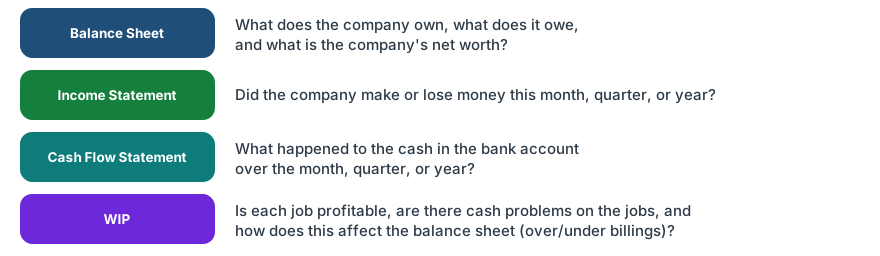
The fourth is what makes construction complicated — and it's complicated because it essentially contains components of the other three. A job is a mini-company: it has a balance sheet (over/under billings and unpaid Accounts Receivable, or AR), an income statement (revenue and costs), and a cash flow — what the customer has paid (total AR − unpaid AR) minus what the company has paid out (total job costs − unpaid AP).
Chapter 2 — The Four Core Financial Reports
2.1 The Balance Sheet
A balance sheet is a snapshot of the company on a single day: everything it owns, everything it owes, and whatever is left over for the owners. Think of your own finances — total what you have (cash, car, house), subtract what you owe (loans, credit cards), and what remains is yours. A company works the same way:
Assets = Liabilities + EquityIn plain terms: what it owns = what it owes + the owners' share. The two sides always balance, because every dollar the company holds came from somewhere — someone lent it (a liability), or the owners put it in or earned it (equity).
Now the construction-specific accounts — the ones general accounting doesn't have — sit on top of the usual cash, AR, AP, debt, and equity:
Assets
- Retention Receivable — amounts the customer withholds from your billings until the job is complete
- Underbilling — completed work you haven't billed yet
Liabilities
- Overbilling — billings ahead of the work completed
- Retention Payable — amounts you withhold from your subcontractors until their work is complete
If it doesn't balance, something is missing — so the Balance Sheet doubles as a data-integrity check.
Order by liquidity
The order of the accounts on a balance sheet is not arbitrary — assets are listed from most liquid to least liquid. Liquidity is how quickly something can be turned into cash without losing value: the most liquid sits at the top, the hardest-to-sell at the bottom.
Think of your own assets, top to bottom:
- Cash is already cash — the most liquid, so it goes first.
- Stock can be sold for cash in a day or two, so it comes next.
- Furniture would be a hassle to sell, but you could unload it to raise cash if you had to — so it sits lower.
- The house comes last: worth the most, but the slowest to turn into cash.
A construction balance sheet follows the same rule — Cash, then Accounts Receivable, then the slower-to-collect items like Retention Receivable and Underbillings, then Prepaids, and finally Equipment and other fixed assets. Liabilities mirror it, with what's due soonest listed first.
Because the sequence carries this meaning, don't let it get scrambled. If your accounting software keeps re-grouping the accounts or won't hold the order you set when you save, that's worth fixing: a balance sheet sorted out of liquidity order misleads anyone reading it.
2.2 The Income Statement
Revenue − Direct Cost = Gross Profit
Gross Profit − Overhead/G&A = Net Income
The key construction twist: Revenue is earned, not invoiced. It follows progress, not the billing schedule.
One report, multiple flavors
The same Revenue − Cost − Expense logic gets presented several ways, and you'll see all of them:
- MTD and YTD — this month's activity next to the year-to-date total.
- Month-by-month columns — Jan, Feb, Mar … Dec, each as its own column, plus a YTD total column.
- Actual vs Budget — YTD actual beside YTD budget, with a Variance column. This is the company-level budgetary report.
- Divisional — the same statement with a subtotal per division (when the company has divisions), rolling up to a company total.
How a single month is calculated
The general ledger stores cumulative (YTD) balances, so one month's activity is a difference:
Month = YTD (this period) − YTD (prior period)March, for example, is YTD-through-March minus YTD-through-February — and the months always tie back to the year:
Jan + Feb + Mar + … + Dec = YTD (full year)A month-by-month statement (year-to-date through March, $000s) looks like this:
| Line | Jan | Feb | Mar | YTD |
|---|---|---|---|---|
| Revenue | 600 | 520 | 680 | 1,800 |
| Direct Cost | 510 | 440 | 570 | 1,520 |
| Gross Profit | 90 | 80 | 110 | 280 |
| Overhead / G&A | 70 | 70 | 70 | 210 |
| Net Income | 20 | 10 | 40 | 70 |
The month columns sum across to the YTD column, and each was backed out of the cumulative ledger (March = YTD-March 1,800 − YTD-Feb 1,120 = 680).
Actual vs Budget
The budgetary report puts YTD actual next to YTD budget and shows the gap:
| Line | YTD Actual | YTD Budget | Variance |
|---|---|---|---|
| Revenue | 1,800 | 1,700 | +100 |
| Direct Cost | 1,520 | 1,400 | +120 |
| Gross Profit | 280 | 300 | −20 |
| Overhead / G&A | 210 | 200 | +10 |
| Net Income | 70 | 100 | −30 |
Variance is Actual − Budget, read line by line: the extra revenue is good, but the +120 on cost and +10 on overhead are overruns — which is why net income landed $30K under plan even though revenue beat budget.
2.3 The Cash Flow Statement
There are two ways to build it, and both land on the same answer:
- Direct — look straight at the bank account: money coming in, money going out.
Beginning cash + cash collected − cash paid = ending cash. It reconciles the beginning balance to the ending balance by listing the actual flows. - Indirect — explain the change in cash by looking at everything except cash. Start with net income and adjust for the movement in every other account. It is easier to calculate from the books and paints a broader picture of why cash moved.
The indirect logic is the counter-intuitive part, and it is worth internalizing:
- AR goes up → cash goes down. Your customers owe you more than they did before — the revenue is booked, but the cash hasn't landed yet.
- AP goes up → cash goes up. You owe your vendors more than before — you would have paid them, but you didn't, so the cash is still in your account.
Add up the change in every account besides cash, and what's left is the change in cash.
The lesson: ↑AR consumes cash, ↑AP temporarily provides cash, retention delays cash.
2.4 The WIP Report
The WIP report consists of every job a contractor is doing. Some jobs are more profitable than others, some haven't started yet, and others are finished or almost finished. It is the construction-specific fourth report, and its totals must tie to the income statement — the revenue and cost recognized across all the jobs on the WIP schedule are the company's revenue and direct cost for the period. Chapter 4 builds it column by column.
Chapter 3 — The Trial Balance: Where Every Report Comes From
Every report in this guide is a grouping of one list. The general ledger holds every account and its balance; the trial balance is that list at a point in time. Because every transaction posts an equal debit and credit, the trial balance must balance: total debits = total credits. The income statement, the balance sheet, and the WIP schedule are not separate data — they are just different groupings and subtotals of these same accounts.
The trial balance is cumulative. It shows account balances, not the activity of a single day — and two clocks run inside it. Balance-sheet accounts (1000s–3000s) accumulate over the entire life of the company: today's Cash, Accounts Receivable, and Retained Earnings carry forward from one period into the next. Income-statement accounts (4000s–9000s) accumulate only within the fiscal year — they build up month by month as year-to-date figures, then close into Retained Earnings at year-end and reset to zero for the new year. So every trial balance is read "as of" a date: life-to-date for the balance-sheet accounts, year-to-date for the income-statement accounts.
3.1 A sample trial balance
A small construction company, year-to-date. Account numbers follow a standard chart of accounts — 1000s assets, 2000s liabilities, 3000s equity, 4000s revenue, 5000s direct job cost, 6000s indirect job cost, 7000s overhead, 8000s other income, 9000s other expense:
| Acct | Account | Debit | Credit | Groups into |
|---|---|---|---|---|
| 1000 | Cash | 200,000 | Balance Sheet — Asset | |
| 1100 | Accounts Receivable | 300,000 | Balance Sheet — Asset | |
| 1150 | Retention Receivable | 50,000 | Balance Sheet — Asset (WIP) | |
| 1200 | Underbillings | 100,000 | Balance Sheet — Asset (WIP) | |
| 1300 | Prepaid Expenses | 50,000 | Balance Sheet — Asset | |
| 1500 | Equipment | 400,000 | Balance Sheet — Asset | |
| 1510 | Accumulated Depreciation | 100,000 | Balance Sheet — Asset (contra) | |
| 2000 | Accounts Payable | 200,000 | Balance Sheet — Liability | |
| 2050 | Retention Payable | 50,000 | Balance Sheet — Liability (WIP) | |
| 2100 | Overbillings | 150,000 | Balance Sheet — Liability (WIP) | |
| 2200 | Line of Credit | 100,000 | Balance Sheet — Liability | |
| 2300 | Accrued Payroll & Taxes | 50,000 | Balance Sheet — Liability | |
| 3000 | Common Stock | 100,000 | Balance Sheet — Equity | |
| 3100 | Retained Earnings (beginning) | 300,000 | Balance Sheet — Equity | |
| 4000 | Contract Revenue (JTD) | 1,250,000 | Income Statement — Revenue (WIP) | |
| 5000 | Job Labor | 400,000 | Income Statement — Direct Cost (WIP) | |
| 5100 | Job Materials | 300,000 | Income Statement — Direct Cost (WIP) | |
| 5200 | Subcontractors | 250,000 | Income Statement — Direct Cost (WIP) | |
| 5300 | Other Job Costs | 50,000 | Income Statement — Direct Cost (WIP) | |
| 7000 | Overhead / G&A | 150,000 | Income Statement — Overhead | |
| 7100 | Depreciation Expense | 50,000 | Income Statement — Overhead | |
| Total | 2,300,000 | 2,300,000 | Debits = Credits |
Three groupings come straight off that "Groups into" column.
3.2 Group the revenue and expense accounts → Income Statement
Revenue on the income statement is JTD revenue, not billings. The WIP true-up (Section 3.4) converts billings into JTD revenue by parking the difference on the balance sheet as an over/under-billing:
Billings                                         1,300,000
+ Underbilling (completed work, not yet billed)    100,000
− Overbilling (billed, not yet completed)        (150,000)
= JTD Revenue                                    1,250,000
− Direct Cost (labor + mat + sub + other)        1,000,000
= Gross Profit                                     250,000
− Overhead / G&A (incl. depreciation)              200,000
= Net Income                                        50,000
3.3 Group the asset, liability, and equity accounts → Balance Sheet
Net income from the income statement closes into equity, so the two statements share a number:
| Assets | Liabilities & Equity | ||
|---|---|---|---|
| Cash | 200,000 | Accounts Payable | 200,000 |
| Accounts Receivable | 300,000 | Retention Payable | 50,000 |
| Retention Receivable | 50,000 | Overbillings | 150,000 |
| Underbillings | 100,000 | Line of Credit | 100,000 |
| Prepaid Expenses | 50,000 | Accrued Payroll & Taxes | 50,000 |
| Equipment (net of depreciation) | 300,000 | Total Liabilities | 550,000 |
| Common Stock | 100,000 | ||
| Retained Earnings | 300,000 | ||
| Current Net Income | 50,000 | ||
| Total Assets | 1,000,000 | Total Liabilities + Equity | 1,000,000 |
Assets 1,000,000 = Liabilities 550,000 + Equity 450,000. It balances — the data-integrity check from Chapter 2 in action.
3.4 The WIP schedule explains the construction accounts
Four of those accounts — Contract Revenue, the job costs, Underbillings, and Overbillings — don't come from a single source. They come from the WIP schedule (Chapter 4), which recomputes each job's JTD revenue and compares it to billings:
| Job | Contract | Est. Costs at Completion | JTD Costs | % | JTD Revenue | JTD Billings | Over / (Under) |
|---|---|---|---|---|---|---|---|
| A | 1,000,000 | 800,000 | 400,000 | 50% | 500,000 | 400,000 | (100,000) |
| B | 1,000,000 | 800,000 | 600,000 | 75% | 750,000 | 900,000 | 150,000 |
| Total | 2,000,000 | 1,600,000 | 1,000,000 | 1,250,000 | 1,300,000 |
Notice how the WIP totals land on the trial balance:
- JTD revenue 1,250,000 → Contract Revenue (Income Statement).
- JTD costs 1,000,000 → the job-cost accounts (Income Statement).
- Job A is billed behind its earnings → Underbillings 100,000 (asset).
- Job B is billed ahead of its earnings → Overbillings 150,000 (liability).
3.5 Why it all ties
Trial balance balances:     Debits 2,300,000 = Credits 2,300,000
Net income flows to equity: Income Statement 50,000 -> Balance Sheet equity
Balance sheet balances:     Assets 1,000,000 = Liabilities 550,000 + Equity 450,000
WIP feeds both:             JTD revenue & cost -> Income Statement
                            over / under billings -> Balance Sheet
One list of accounts; three reports. Once you can see the groupings, every report in this guide stops being a new thing to memorize and becomes a different view of the same ledger.
Chapter 4 — Work in Progress (WIP): The Bridge
4.1 What is a WIP report?
A WIP report summarizes each job into a single row, and includes all the key information in columns. This allows a user to quickly understand the important, bad, or good jobs a company has at a glance. Each job contains further detail, which is covered in Chapter 8.
4.2 A basic WIP report
Each row carries these columns (JTD = job-to-date — the cumulative figure for the job):
- Contract Amount
- Est. Costs at Completion
- Est. Gross Profit =
Contract Amount − Est. Costs at Completion - JTD Costs
- JTD Billings
- JTD Revenue =
(JTD Costs / Est. Costs at Completion) × Contract Amount - Overbilling — when
JTD Revenue < JTD Billings - Underbilling — when
JTD Revenue > JTD Billings - Billing Backlog =
Contract Amount − JTD Billings - Revenue Backlog =
Contract Amount − JTD Revenue - % Complete =
JTD Costs / Est. Costs at Completion(never below 0% or above 100%)
4.3 Two terms people constantly confuse
The two terms people constantly confuse:
- Revenue — recognized under accounting rules as work is performed on jobs over a period of time.
- Billings — amounts billed to the customer on a job over a period of time.
4.4 Over- and under-billing, and the Balance Sheet
JTD Billings > JTD Revenue  -> Overbilling  -> LIABILITY (you owe future work)
JTD Revenue > JTD Billings  -> Underbilling -> ASSET (completed work, not yet billed)
Underbilling is an asset, but a low-quality one if it comes from unapproved change orders or optimistic estimates. It can also flag a problem with the job. If the cost ratio (JTD costs / Est. Costs at Completion) says a job is 90% complete, it should have billed roughly 90% of the contract too. If billings are trailing at 70%, the job may really be only 70% complete — meaning the denominator (Est. Costs at Completion) is understated and needs to rise, which lowers the job's estimated gross-profit %. The real question underbilling raises is: why can't you bill?
Overbilling is a liability, but a good thing. Taken to the extreme, a customer would pay you 100% upfront — you'd carry a liability until you'd worked it off, but at least the cash is in the bank.
4.5 How WIP connects to the three statements
JTD Revenue                -> Revenue (Income Statement)
JTD Costs                  -> Direct Cost (Income Statement)
Underbilling               -> asset on the Balance Sheet
Overbilling                -> liability on the Balance Sheet
JTD Billings − Collections -> Accounts Receivable (Balance Sheet)
Cash Collected − Cash Paid -> Operating cash flow (Cash Flow Statement)
This is why WIP is the core basis for revenue recognition and balance-sheet classification.
4.6 Profit Fade / Profit Gain
Contract 1,000,000 | Original budget 800,000 | New Est. Costs at Completion 950,000
Original expected profit = 1,000,000 − 800,000 = 200,000
Current estimated profit = 1,000,000 − 950,000 =  50,000
Margin lost = 150,000
The job hasn't "lost money" on paper yet — but $150K of expected profit has quietly evaporated. That is exactly what WIP exists to surface.
And it can strike at any stage of a job. Barely started and discover the equipment will cost $200K more than planned? Profit fade. Almost done and realize it will take three more months to fix problems? Profit fade. The moment the estimated final cost rises, the expected margin drops.
How much of the hit lands on this period depends on how far along the job is. A rough rule of thumb: recognized loss ≈ percent complete × overrun. A job that's 5% complete takes about 5% × $200K ≈ $10,000 now; a job that's 90% complete takes nearly all of it. It isn't exactly the percent complete, because the overrun also lands in the denominator of % complete = JTD costs / Est. Costs at Completion and nudges that percentage down — but the rule of thumb captures the shape: the further along the job, the bigger the immediate hit.
This is the cruel asymmetry of timing: the best time to catch fade is early. At 5% complete, only a sliver of an overrun lands in this period; at 95% complete, almost the whole loss must be booked at once, because everything not yet recognized comes due as the job closes. The later fade surfaces, the harder it hits.
It runs in reverse, too — profit gain. If the estimated final cost drops — a subcontractor buyout beats budget, a feared risk never shows up, the crew outperforms the plan — the estimated margin rises, and the extra profit is recognized the same way, proportional to percent complete. WIP surfaces good news on the same clock as bad: a little at a time early on, and the rest as the job finishes.
Chapter 5 — Understanding Job Cash Flow
5.1 Profit is worthless, cash is king
A contractor can show strong revenue, healthy profit, and solid project margin — and still go bankrupt. Revenue is not the same as cash: revenue recognized is not cash received, and vendor bills can fall due before the customer's cash arrives. Cash is king — a company that can't make payroll doesn't survive, no matter how profitable it looks on paper.
5.2 AR aging — older means lower quality
Split ordinary AR from retention: Open Ordinary AR = Invoice − Collections − Retention. Then read the tiers: Current/1–30 are healthy; 61–90 is a risk zone needing an owner; 90+ may need an allowance or a dispute reason. Old AR is often a compliance problem — missing documentation, approvals, or change-order paperwork — not just a slow customer.
5.3 AP aging — financing you can't stretch forever
AP is short-term financing from vendors, but stretching it past 60–90 days risks work stoppages, lien rights, and unhappy vendors. Payment priority is about vendor criticality and execution risk, not simply paying the oldest bill.
5.4 Retention — contractual cash delay
Net Retention Cash Delay = Retention Receivable − Retention PayableRetention isn't a profit problem; it's restricted cash. When it releases (final acceptance, punch list, warranty) matters more than the balance.
5.5 Pay-when-paid — AP chained to AR
On many jobs your payable to a subcontractor isn't due on a fixed date — it's due when you get paid for that work. A pay-when-paid clause says you'll pay the sub within a set time after the owner pays you; a stricter pay-if-paid clause makes the owner's payment an actual condition — if the owner never pays, you never owe the sub. Either way your AP is chained to your AR: the cash to pay subcontractors shows up only after the customer's cash does.
This is why AP and AR can't be read apart. A late owner payment doesn't just stall your AR — it legitimately defers the matching AP, and that is what protects your cash. The danger is paying subs ahead of collecting from the owner, which turns someone else's financing problem into yours.
Lien waivers are the paperwork that keeps it safe. When you pay a sub, you collect a lien waiver releasing their right to lien the project for that amount; when you bill the owner, you hand over your own waivers to get paid. Treat them as part of the cash cycle — an unsigned waiver can hold up a collection (and become old AR) or expose you to a double-payment claim. Pay-when-paid terms plus clean lien waivers are how a contractor keeps AP and AR moving in step instead of draining cash.
Chapter 6 — Change Orders
6.1 What a change order is
You were hired to do a job, so you bid it. But now the customer wants more or less work — or maybe a different material or piece of equipment that costs more. The change order is what makes up the cost difference, adjusting the contract accordingly.
6.2 Status matters
Approved -> becomes part of the contract
Pending  -> sometimes included on the WIP if the contractor believes they'll get it
Rejected -> included only for reference
Internal -> moves cost budget from one code to another; no change to the contract
6.3 Amount is only half the story
The change order amount is what gets billed to the customer. But a change order also carries its own cost budget — and the gap between the two is the change order's estimated gross profit:
Change Order Amount − Change Order Cost Budget = Change Order Est. Gross ProfitA change order can add gross profit to the job and still hurt it. Here's how. JTD revenue is % complete × contract, where % complete = JTD costs / Est. Costs at Completion. Suppose the job is expected to earn a 30% gross margin and the change order comes in at only 20%. Blending that lower-margin work in drags the job's overall margin below 30%. And JTD revenue is really your costs-to-date plus the profit earned on them — so when the margin % drops, the profit earned on the costs you've already spent shrinks, and JTD revenue falls with it — even though the contract just got bigger. That decline is profit fade.
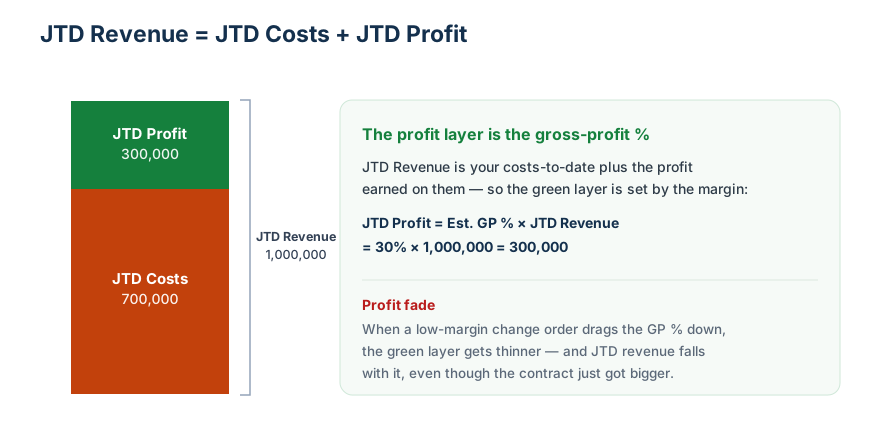
Worked example — here it is in numbers (using a break-even change order to make the fade unmistakable):
Before the CO:
  Contract                          1,000,000
  Est. Costs at Completion            800,000   (20% margin)
  JTD Costs                           600,000   -> 75% complete
  JTD Revenue                         750,000   (1,000,000 × 75%)

Add a CO: Amount 200,000, Cost Budget 200,000  (0% margin — below the job's 20%):
  Revised Contract                  1,200,000
  Revised Est. Costs at Completion  1,000,000
  JTD Costs                           600,000   -> 60% complete  (more cost still to go)
  JTD Revenue                         720,000   (1,200,000 × 60%)
The contract grew by 200,000, yet JTD revenue fell from 750,000 to 720,000 — a 30,000 profit fade. The lower the change order's margin relative to the job, the worse the fade. (A negative-margin CO is worse still — it dilutes margin and books an outright loss.)
And it gets sharper: a change order can raise your total estimated profit in dollars and still pull JTD revenue and JTD profit down, purely because it lowers the margin.
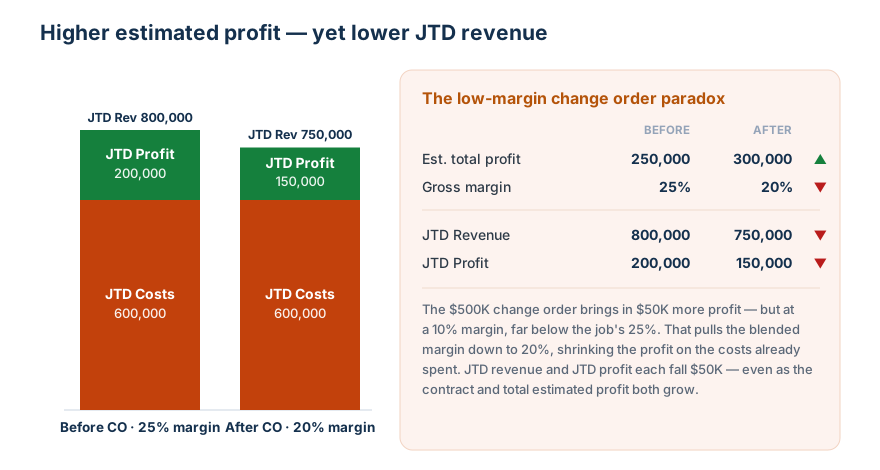
Look at the orange: JTD costs are identical in both bars (600,000) — no new work has been done. All that changed is the deal. Yet adding $50,000 of estimated profit at a low margin shrinks the green: JTD revenue falls 800,000 → 750,000 and JTD profit falls 200,000 → 150,000. More profit on paper, less profit recognized today.
Chapter 7 — Construction Project Economics
7.1 The key components
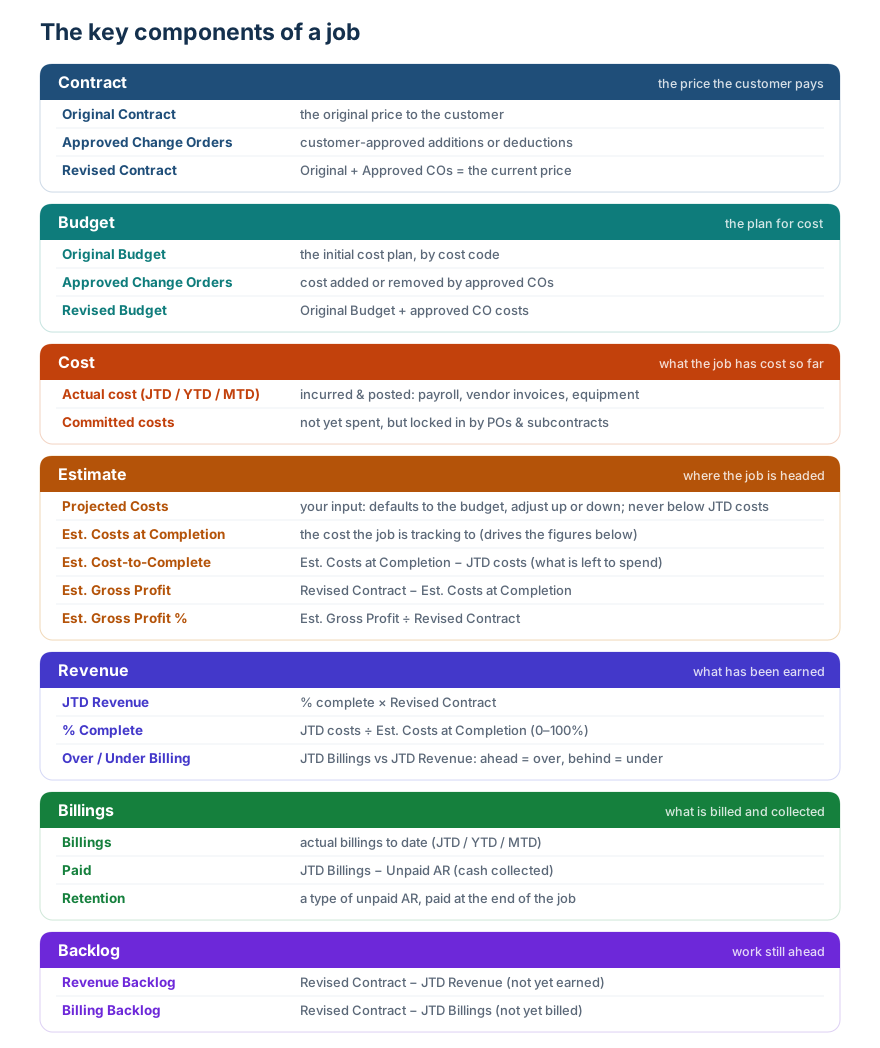
7.2 Worked example — one project end to end
| Item | Amount | How |
|---|---|---|
| Original Contract | 1,000,000 | |
| Approved Change Orders | 120,000 | |
| Revised Contract | 1,120,000 | Original + Change Orders |
| JTD Costs | 420,000 | |
| Est. Cost-to-Complete | 380,000 | |
| Est. Costs at Completion | 800,000 | JTD Costs + ETC |
| Estimated Gross Profit | 320,000 | Revised Contract − Est. Costs at Completion |
| % Complete | 52.5% | JTD Costs ÷ Est. Costs at Completion |
| JTD Revenue | 588,000 | Revised Contract × % Complete |
| JTD Billings | 620,000 | |
| Overbilling | 32,000 | JTD Billings − JTD Revenue |
| Backlog | 532,000 | Revised Contract − JTD Revenue |
| Collections | 540,000 | |
| Retention | 50,000 | |
| Accounts Receivable | 30,000 | JTD Billings − Collections − Retention |
Read it as a sentence: a $1.12M job, 52.5% done, expected to earn $320K, currently billed slightly ahead of what it has earned, with $30K of ordinary AR, $50K locked in retention, and $532K of work still to go.
Chapter 8 — Job Detail Reports
8.1 The reports at a glance
- WIP — a summary job overview.
- Job Cost Detail — shows all the costs on a job that add up to the JTD costs, typically broken out by cost code.
- Job Billing Detail — shows all the customer billings that add up to the JTD billings, typically broken out by customer billing.
- Job Budget / CTC — shows budget, JTD cost, committed cost, actual hours, budget hours, and variance. Sometimes has more columns — projected cost, original budget, approved change orders, and so on — and often contains notes. Its total is the projected cost used on the WIP report.
- Labor Report — shows the field how many hours they have left to go and their actual hourly labor rate (the rate can vary from job to job, depending on who is charging to the job).
8.2 Job Cost Detail
The lowest-level evidence — every transaction by Job, Cost Code, Cost Type, vendor/employee, date, amount, hours, and source document. Every JTD cost on WIP must trace back here. If it can't be traced, it can't be explained.
8.3 Job Budget Variance
Don't judge a cost code by actual cost alone. Include what's already committed and what's still expected:
Remaining Committed = max(Committed − Actual, 0)
Projected Cost      = Actual + Remaining Committed + Estimated Uncommitted
Projected Variance  = Budget − Projected Cost   (negative = overrun)
Worked example:
Budget 100,000 | Actual 50,000 | Remaining committed 35,000 | Est. uncommitted 25,000
Actual variance    = 100,000 − 50,000                   = 50,000  (looks fine)
Committed variance = 100,000 − 50,000 − 35,000           = 15,000  (tighter)
Projected variance = 100,000 − 50,000 − 35,000 − 25,000  = −10,000 (already over!)
Same cost code, three very different stories. Always read variance by cost code — a total can hide a concrete saving masking an electrical overrun.
8.4 Job Labor Report
Labor goes wrong two ways — too many hours, or too high a rate:
Cost per Hour       = Actual Labor Cost / Actual Hours
Hour Variance       = Budget Hours − Actual Hours          (productivity)
Labor Cost Variance = Budget Labor Cost − Actual Labor Cost (rate / mix / overtime)
8.5 Job Cost-to-Complete
The hardest report, because it is a forecast: the project manager's honest estimate of remaining scope, subcontract cost, rework, escalation, and unposted bills.
Est. Costs at Completion = JTD Costs + Estimated Cost to Complete
Projected Variance = Budget − Est. Costs at Completion
Cost-to-Complete is the core input to WIP quality. Garbage here means garbage revenue and profit everywhere upstream — and it is the hinge between this guide's actuals and Guide 2's forecasts.
Chapter 9 — Service Reports
Beyond construction projects, many contractors also run a service business — short repair jobs and recurring maintenance. It reports differently from project work, because the jobs are small and fast.
9.1 Work Orders
A work order is a job — just a small one, typically finished in days or weeks instead of the months or years a construction project runs. Because they are so short, work orders have no cost-to-complete projection and no WIP — there is nothing to forecast. The job is done when it's done, and that's it. This kind of work is often called pull-through work (it pulls through from a service relationship) or start-up work.
A work-order report typically carries: WO # · customer/site · service type · status · technician · open/scheduled/completed dates · labor hours · parts · billable vs. non-billable · linked PM agreement.
9.2 Planned Maintenance (PM) Agreements
A planned maintenance agreement is a contract to maintain a customer's equipment — HVAC, boiler, and the like — on an annual basis, typically with a technician visiting quarterly. PM agreements are usually loss leaders, designed to make only a small profit. Their real purpose is to keep customers happy and the relationship warm, so the contractor wins the profitable work when equipment needs repair or replacement.
A PM report typically carries: agreement # · customer/site · contract value · billing frequency · covered scope · visit schedule · visits completed vs. due · deferred revenue over the term · renewal date.
9.3 Work orders vs. PM — the pull-through ratio
The key service metric is the ratio of work orders (pull-through work) to planned maintenance. A ratio around 3 to 1 is considered good — it means the maintenance base is doing its job, generating roughly three times as much pull-through repair and replacement work as the maintenance itself.
Appendix A — Reports in This Guide, by Category
| Report | Category | Chapter |
|---|---|---|
| Income Statement | 1 — Company level | 2 |
| Balance Sheet | 1 — Company level | 2 |
| Cash Flow Statement | 1 — Company level | 2 |
| Actual-vs-Budget (budgetary) | 1 — Company level | 2 |
| Summary WIP | 1 — Company level | 4 |
| Trial Balance | 1 — Company level | 3 |
| AR Aging | 1 — Company level | 5 |
| AP Aging | 1 — Company level | 5 |
| Retention Summary | 1 — Company level | 5 |
| Change Order Report (roll-up) | 1 — Company level | 6 |
| Project Economics | 2 — Job level | 7 |
| Job Cost Detail | 2 — Job level | 8 |
| Job Budget Variance | 2 — Job level | 8 |
| Job Labor Report | 2 — Job level | 8 |
| Job Cost-to-Complete | 2 — Job level | 8 |
| Change Order Detail | 2 — Job level | 6 |
| Work Orders | 3 — Service level | 9 (not in source) |
| PM Agreements | 3 — Service level | 9 (not in source) |
The forecasting reports live in Guide 2: Future Reports.
Appendix B — Master Glossary
| Term | Meaning |
|---|---|
| Assets = Liabilities + Equity | The balance-sheet identity |
| Revenue | Value earned by performing work (≠ billings, ≠ cash) |
| JTD (job-to-date) | A job's cumulative total since it began (costs, billings, revenue) |
| JTD Revenue | Revenue recognized from progress: Contract × % Complete |
| Billings | Amounts invoiced to the customer |
| Collections | Cash actually received |
| Direct Cost | Cost attributable to a job (labor, material, sub, equipment) |
| Gross Profit | Revenue − Direct Cost |
| Overhead / G&A | Company costs not tied to one job |
| Net Income | Profit after all costs and expenses |
| AR / AP | Receivables owed to us / Payables we owe |
| Retention | Contractual amount withheld and released later |
| Revised Contract | Original Contract + Approved Change Orders |
| Committed Cost | Cost locked by PO/subcontract, not necessarily posted |
| JTD / ETC | JTD Costs / Estimated Cost to Complete |
| Est. Costs at Completion | JTD Costs + Estimated Cost to Complete (the expected final cost) |
| % Complete | JTD Costs / Est. Costs at Completion (cost-to-cost method) |
| Overbilling | JTD Billings − JTD Revenue → liability |
| Underbilling | JTD Revenue − JTD Billings → asset |
| Backlog | Revised Contract − JTD Revenue |
| Days Past Due | As-Of Date − Due Date |
| Margin Impact | CO Amount − CO Cost Impact |
Appendix C — The Engineer's View: Reports Are Queries
Don't memorize layouts — model the data, then treat each report as a view over it.
Tables:  jobs, contracts, change_orders, budgets, cost_codes, cost_transactions,
         commitments, billings, collections, vendor_bills, vendor_payments,
         payroll, gl_entries

Balance Sheet     = GL balances as of a date
Income Statement  = GL activity over a date range
Cash Flow         = cash movement + working-capital changes
WIP               = job-level JTD revenue and cost forecast
Job Cost Detail   = cost-transaction drilldown
AR / AP Aging     = unpaid invoices / bills by age
End of Guide 1. Continue with Guide 2: Future Reports for backlog, the forecasted income statement, the 13-week cash flow, and the forecasted balance sheet. For unabridged detail behind every chapter, see the companion reference reports-by-category.en.md.